Cued Imagery Task
In this task, participants view two stimuli in sequence, then a retro-cue indicates which stimulus to mentally imagine. Participants rate the vividness of their imagery and then confirm their memory in a follow-up challenge. This task is adapted from the retro-cued imagery paradigm introduced by Dijkstra et al.1, which demonstrated that early visual cortex activity during imagery resembles perception and can be decoded to identify the imagined content.
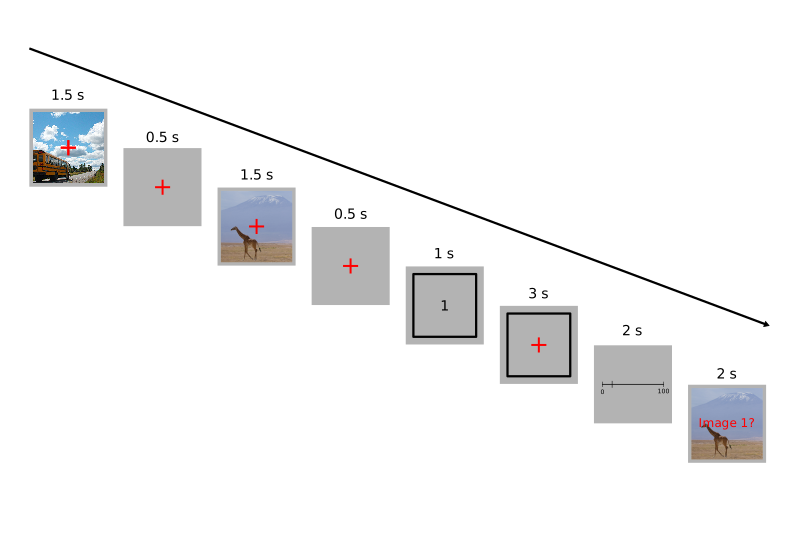
An overview of the cued imagery task design.
The paradigm enables researchers to study mental imagery while controlling for perceptual confounds, since both potential imagery targets are presented identically before the cue. The retro-cue design allows investigation of working memory, imagery vividness, and neural representations of imagined content.
Quick Start
- Create or open an experiment from your Dashboard
- Click Add task and select "Cued Imagery"
- Upload a stimulus set with images to serve as target/distractor pairs
- Configure timing parameters and the challenge type (simple yes/no or mosaic selection)
- Preview your experiment
New to Meadows? See the Getting Started guide for a complete walkthrough.
Alternative tasks
- Use a Visual Search task for speeded search among multiple stimuli.
- Use a Timed Key Response task for simpler image presentation with reaction time measurement.
- Use a Multiple Arrangement task for measuring perceptual similarity between stimuli.
Parameters
Customize the task by changing these on the Parameters tab of the task.
Timing
Control the temporal structure of trials.
Stimulus Duration-
How long each stimulus is shown, in milliseconds. Default: 1500 ms. Valid range: 1 to 10,000 ms.
Fixation Duration-
How long the break between stimuli is, in milliseconds. Default: 500 ms. Valid range: 1 to 10,000 ms.
Cue Duration-
How long the cue (1 or 2) is shown, in milliseconds. Default: 1000 ms. Valid range: 1 to 10,000 ms.
Imagery Duration-
How long the imagery phase lasts, in milliseconds. Default: 3000 ms. Valid range: 1 to 10,000 ms.
ITI Duration-
Time between trials in milliseconds. Default: 2000 ms. Valid range: 1 to 10,000 ms.
Rating Configuration
Configure the vividness rating scale.
Rating Instruction-
The text to display with the rating prompt. Default: "How vivid was your imagery?". Maximum: 80 characters.
Rating Min-
The text to display to the left of the rating slider (low vividness). Maximum: 30 characters.
Rating Max-
The text to display to the right of the rating slider (high vividness). Maximum: 30 characters.
Rating Forced-
If enabled, the rating slider must be moved at least once before it can be confirmed. Default: unchecked.
Rating Start-
Starting value of the rating slider. Options:
Middle (0.5): Slider starts at midpointRandom: Slider starts at a random position
Default:
Middle (0.5).
Challenge Configuration
Configure the memory challenge at the end of each trial.
Challenge Type-
Type of task for confirming the target. Options:
Display a single image with a yes/no prompt: Show one image and ask if it matchesDisplay a mosaic to select from: Show a grid of images for selection
Default:
Display a single image with a yes/no prompt. Mosaic Size-
Number of options to display in the mosaic grid (if using mosaic challenge). Options: 4 (2×2), 9 (3×3), 16 (4×4), 25 (5×5), 36 (6×6). Must be equal to or less than the total number of unique stimuli. Default: 9.
Match Instruction-
The text to display with the match prompt at the end of the trial. Default: "Was this the target item?". Maximum: 80 characters.
Match Instruction Color-
Color of the match instruction text. Options:
Red,Black. Default:Red. Match Instruction Location-
Location of the match instruction text. Options:
Center: over stimulus: Text overlays the stimulusBelow stimulus: Text appears below the stimulus
Default:
Center: over stimulus. Match Response Keys-
Valid keyboard keys for the response to the match prompt. These correspond to [match] and [not a match], in that order. Default: D (match), K (not a match).
Trial Generation
Control how trials are generated from your stimulus set.
Sampling-
How to select target/distractor pairs. Options:
Each stimulus occurs once: Each stimulus serves as target exactly onceAll pairs randomized: Random combinations of stimulus pairs
Default:
All pairs randomized. Maximum Number of Trials-
If trials (pairs) are chosen randomly, how many trials to present. Default: 200. Valid range: 1 to 10,000.
Display
Configure visual appearance.
Fixation Cross Size-
Size of the fixation cross (same unit as stimulus). Default: 4.0. Valid range: 0.2 to 40.0.
Performance Feedback
Configure optional performance monitoring and feedback.
Feedback Threshold-
Expected performance on the match prompt, below which a warning is displayed. Set to 0 (default) to disable performance checking. Chance-level performance is 0.5. Valid range: 0 to 1.
Feedback Threshold Probability-
P-value; minimum allowed probability of the observed performance given the performance threshold. Typically 0.05 or 0.01. Default: 0.05.
Feedback Trials-
Number of recent trials used to calculate performance. Default: 5.
Feedback Text-
Warning message shown when performance drops below threshold.
Feedback Duration-
How long the feedback is displayed, in milliseconds. Default: 4000 ms.
Data
For general information about the various structures and file formats that you can download for your data see Downloads.
Trial-wise "annotations" (table rows), with one row per trial. The first stimulus (stim1) is always the target; the second (stim2) is the distractor—note these may have been presented in a different order during the trial. Columns:
trial- numerical index of the trialtime_trial_start- timestamp when the challenge phase began (seconds since 1/1/1970)time_trial_response- timestamp when the participant responded (seconds since 1/1/1970)stim1_id- meadows internal id of the target stimulusstim1_name- filename of the target stimulus as uploadedstim2_id- meadows internal id of the distractor stimulusstim2_name- filename of the distractor stimulus as uploadedrating- vividness rating value between 0 and 1matching_trial- whether the prompted stimulus was the target (true) or distractor (false)inverted_trial- whether the target was shown second (true) or first (false)key_pressed- the key pressed in response (orMOUSEfor mosaic selection)correct_response- whether the participant correctly identified match/non-matchchosen_stim_name- for mosaic trials, the name of the selected stimulus
Analysis
Calculate Imagery Vividness by Condition
Analyze vividness ratings and their relationship to accuracy.
import pandas as pd
import matplotlib.pyplot as plt

# Load the annotations data
df = pd.read_csv('Meadows_myExperiment_v1_annotations.csv')

# Calculate reaction time in milliseconds
df['rt_ms'] = (df['time_trial_response'] - df['time_trial_start']) * 1000

# Basic statistics by accuracy
stats = df.groupby('correct_response').agg({
    'rating': ['mean', 'std', 'count'],
    'rt_ms': ['mean', 'std']
}).round(3)
print(stats)

# Plot vividness ratings distribution
fig, axes = plt.subplots(1, 2, figsize=(12, 5))

# Histogram of ratings
axes[0].hist(df['rating'], bins=20, edgecolor='black')
axes[0].set_xlabel('Vividness Rating')
axes[0].set_ylabel('Frequency')
axes[0].set_title('Distribution of Imagery Vividness')

# Ratings by accuracy
df.boxplot(column='rating', by='correct_response', ax=axes[1])
axes[1].set_xlabel('Correct Response')
axes[1].set_ylabel('Vividness Rating')
axes[1].set_title('Vividness by Response Accuracy')
plt.suptitle('')

plt.tight_layout()
plt.show()
library(tidyverse)

# Load the annotations data
df <- read_csv('Meadows_myExperiment_v1_annotations.csv')

# Calculate reaction time
df <- df %>%
  mutate(rt_ms = (time_trial_response - time_trial_start) * 1000)

# Summary statistics by accuracy
df %>%
  group_by(correct_response) %>%
  summarise(
    mean_rating = mean(rating),
    sd_rating = sd(rating),
    mean_rt = mean(rt_ms),
    n = n()
  )

# Plot vividness by accuracy
ggplot(df, aes(x = factor(correct_response), y = rating)) +
  geom_boxplot(fill = 'steelblue', alpha = 0.7) +
  labs(x = 'Correct Response', y = 'Vividness Rating',
       title = 'Imagery Vividness by Response Accuracy') +
  theme_minimal()
References
-
Dijkstra, N., Bosch, S. E., & van Gerven, M. A. J. (2017). Vividness of visual imagery depends on the neural overlap with perception in visual areas. Journal of Neuroscience, 37(5), 1367–1373. doi:10.1523/JNEUROSCI.3022-16.2016 ↩